
Why Customer Portals Are Unique in the Machinery and Equipment Industry
Customer portals are essential for machine manufacturers to streamline service processes and provide better support to customers. They bring together key functions such as machine monitoring, service requests, maintenance planning, spare parts management, and remote support in one central location. Here are the main benefits:
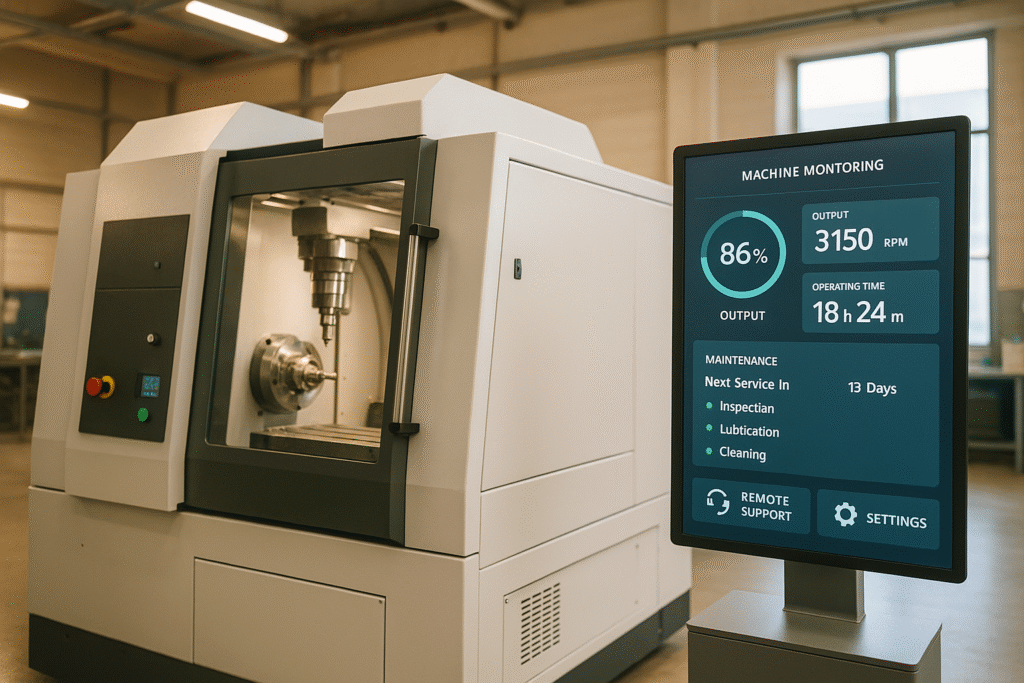
- Machine status monitoring: real-time dashboards, predictive maintenance, alarm functions.
- Service Request System: Smart ticket creation, real-time status updates, 24/7 availability.
- Maintenance planning: Automated scheduling, intelligent notifications, digital documentation.
- Spare Parts Management: Digital spare parts catalog, inventory management, automated ordering.
- Remote Support: Real-time diagnosis, secure communication, proactive support.
- Technical documentation: Centralized library, smart search functions, GDPR-compliant security.
- Key performance indicators: Real-time analyses, data visualization, optimization of machine performance.
- Service history tracking: Seamless documentation, warranty and compliance verification.
These portals not only offer more efficient processes, but also greater customer satisfaction thanks to transparent and digital solutions.
Typical features of customer portals: more than just a spare parts store
To meet today’s demands, customer portals must not only be technically reliable, but also put the user first and meet the highest security standards. Three key pillars contribute to the success of a customer portal: security, user-friendliness, and system integration. These factors ensure a seamless digital service.
Safety has top priority. Especially in the context of the GDPR, modern portals must meet the highest security requirements. These include
- Encrypted data transmission (TLS/SSL)
- Two-factor authentication
- Role-based access controls
- Regular safety audits
User-friendliness determines how well the portal is accepted by users. An easy-to-use interface ensures that customers can use the desired functions quickly and without much effort. This is particularly important:
| Usability aspect | Benefits for the user |
|---|---|
| Responsive design | Access from any device, whether desktop or mobile |
| Clear navigation | Easy to find relevant information |
| Personalized dashboards | Customization to individual needs |
| Multilingualism | Localized interfaces and support |
System integration forms the technical backbone of a successful customer portal. A direct connection to existing systems enables:
- Real-time monitoring of machine data
- Automated maintenance planning
- Synchronized service histories
- Efficient Spare Parts Orders
Data presentation also plays a decisive role. Customers expect a clear and understandable presentation of information, for example:
- Clear visualization of machine statuses and maintenance intervals
- Comprehensible technical documentation
- Traceable service histories
Mobile availability is another key aspect. Customers need to have access to technical documentation, maintenance manuals, trouble tickets, and spare parts catalogs even when they are on the go.
To ensure that a customer portal remains successful in the long term, continuous improvement is essential. Regular updates and adjustments based on user feedback ensure that the portal always remains up to date and meets evolving needs.
These core functions serve as the foundation upon which specialized portal solutions can be built. A true self-service portal for the industry not only enables spare parts ordering but also ticket submission, access to operational data, and service reports—regardless of time, location, or device.
Are you planning to set up a customer portal for your service?
In an introductory call, we’ll show you how self-service, a spare parts store, IoT, and knowledge management can be integrated into a single platform—building on your installed base.
→ Schedule an introductory call

The Eight Core Functions of a Customer Portal in the machinery and equipment industry—Built on a Foundation of Security, User-Friendliness, and System Integration.
Machine status monitoring
Real-time monitoring allows you to keep an eye on the status and performance of your machines at all times.
Important machine data at a glance
A user-friendly dashboard clearly displays all relevant operating data:
| Key figure | Presentation | Advantage |
|---|---|---|
| Operating status | Traffic light system (green/yellow/red) | Quick recognition of the status |
| Production performance | Dynamic graphics | Real-time analysis of performance |
| Energy consumption | Progression curves | Efficient use of energy input |
| Temperatures | Numerical displays | Control of critical values |
| Fault reports | Push Notifications | Immediate response to problems |
Intelligent alarm functions
Graduated alarm levels allow you to react flexibly and in a targeted manner:
- Maintenance instructions when certain operating hours have been reached
- Warnings when limit values are exceeded
- Alarms in the event of impending failures to prevent damage
These functions facilitate the planning and implementation of predictive maintenance.
Predictive Maintenance
Thanks to continuous data acquisition, wear and potential faults can be detected at an early stage. This minimizes unplanned downtime and extends the service life of the machines.
Secure data and seamless integration
A secure IoT infrastructure ensures encrypted and GDPR-compliant data transmission. At the same time, integration into existing systems offers numerous advantages:
- Automatic documentation of all operating data
- Connection with maintenance planning tools
- Direct access to technical documentation
- Automated service requests for critical conditions
These functions make machine monitoring not only efficient, but also safe and future-oriented.
Service request system
A well-designed service request system allows customers to submit their requests quickly and easily directly through the customer portal. It complements real-time machine monitoring and improves the efficiency of the entire service process.
Smart ticket creation
The system collects all relevant information in order to process inquiries in a precise and targeted manner:
| Component | Function | Advantage |
|---|---|---|
| Machine selection | Automatic identification | Linking with specific device data |
| Problem categorization | Predefined categories | Faster forwarding to the right experts |
| Priority classification | Selection of urgency | Optimized order of processing |
| IoT integration | Automatic data acquisition | Complete and precise fault details |
As soon as a request is recorded, the system ensures that the entire processing procedure can be tracked seamlessly.
Real-time status and tracking
Customers keep track of the status of their tickets – in real time. Thanks to automatic notifications and clear documentation, they benefit from complete transparency:
- Access to the entire communication history
- Overview of all measures implemented
These functions strengthen confidence in the editing process and ensure greater clarity.
Available at any time
The portal makes it possible to create and manage service requests around the clock. By integrating IoT data, critical problems can even be detected automatically and corresponding tickets generated without delay.
Automated processes
Automation makes the processing of service requests faster and more efficient:
- Automatic assignment to the appropriate service technicians
- Pre-qualification through the analysis of IoT data
- Smooth integration into dispatching systems
Thanks to a user-friendly interface and intelligent automation functions, requests are processed quickly and effectively. Customers benefit from an optimized service experience.
Maintenance planning
Sophisticated maintenance planning transforms reactive maintenance into predictive and efficient machine management. With the help of IoT sensors and automated tools, maintenance work can be coordinated in a targeted manner. In combination with real-time monitoring and a service request system, planning ensures optimized maintenance processes.
Automated scheduling
The system creates maintenance plans based on precise data:
| Data basis | Planning criteria | Advantages |
|---|---|---|
| Operating hours | Machine running time | Optimum maintenance intervals |
| Sensor data | Wear indicators | Early problem detection |
| Production cycles | Utilization profiles | Minimal production interruptions |
| Machine history | Maintenance experience | Demand-oriented planning |
This data-based planning lays the foundation for further automated functions and ensures smooth maintenance management.
Intelligent notification system
A multi-level alarm system supports maintenance planning:
- Routine maintenance: Reminders based on defined intervals.
- Status-based alerts: Notifications for critical sensor data.
- Wear Alerts: Notifications when spare parts are needed.
- Warranty information: Warnings about expiry of warranty periods.
This system not only helps to avoid downtime, but also ensures that all legal and quality-related requirements are met.
Documentation and compliance
Digital maintenance logs provide a complete record of all maintenance work carried out. This is particularly important for:
- Proof of compliance with warranty conditions.
- Compliance with legal and regulatory requirements.
- Quality assurance and certifications.
Precise documentation also makes it easier to track and optimize maintenance processes.
Predictive Maintenance for Maintenance Planning
IoT sensors continuously analyze machine data to detect potential problems at an early stage:
| Measured values | Monitoring | Action |
|---|---|---|
| Temperature | Limit value monitoring | Automatic maintenance request |
| Vibration | Anomaly detection | Preventive maintenance |
| Current consumption | Trend analysis | Optimization of maintenance intervals |
| Output quality | Quality monitoring | Early corrective measures |
This predictive analysis enables machine manufacturers to digitize their after-sales processes and significantly increase machine availability. IoT technologies and automated planning tools reduce downtime and enable efficient coordination of maintenance work.
Spare Parts Management
Well-organized spare parts management improves the entire process—from identifying a part to placing an order. The key aspects of digital spare parts management are explained below.
Digital Spare Parts Catalog
A digital spare parts catalog is based on the customer’s specific machinery and displays only relevant parts. The search functions make it easier to precisely identify the parts needed:
| Search option | Search function | Advantage |
|---|---|---|
| Machine-specific | Filter by serial number | Exact assignment |
| Category-based | Grouping by components | Fast navigation |
| Text search | Part number/description | Flexible search |
| Visual Search | Interactive 3D Models | Intuitive Identification |
Building on this, the system enables orders to be placed directly from maintenance logs, which significantly simplifies the process.
Intelligent ordering system
The ordering system is seamlessly integrated into maintenance planning. Technicians can enter important information when ordering, such as
- Machine assignment
- Installation position
- Urgency
- Delivery address
- Cost center allocation
Inventory Management and Availability
Real-time monitoring ensures transparency of stock levels and delivery times:
| information | Benefits | Updating |
|---|---|---|
| In-Stock | availability | Real-time |
| Delivery times | Planning reliability | Up to date |
| Alternative parts | More flexibility | If required |
| Minimum stocks | Automatic reordering | Continuous |
Integration with predictive maintenance
By analyzing machine data and wear patterns, the system recommends spare parts before a failure occurs. This minimizes unplanned downtime and optimizes inventory management.
Automated notifications
The system actively notifies users of important events such as shipping status, delivery delays, low inventory levels, upcoming maintenance, and new spare part versions.
This digital approach not only improves efficiency but also ensures higher customer satisfaction through transparent processes and rapid availability of the necessary parts.
Remote support tools
Modern customer portals offer practical tools for remote maintenance and support, making it possible to resolve issues quickly and without on-site visits. These tools are particularly helpful when it comes to maintaining and servicing machinery. They complement the portal’s previously described features and help make service more efficient.
Real-Time Diagnosis and Communication
The portal provides various communication channels that enable direct collaboration between technicians and customers:
| Function | Field of application | Advantages |
|---|---|---|
| Video support | Visual inspection | Fast and precise analysis |
| Live chat | Clarification of queries | Immediate communication |
| Remote access | Machine diagnostics | Accurate fault detection |
| Screen sharing | Operating aids | Effective training and support |
Intelligent ticketing system
In addition to the planning tools, remote support enables efficient fault diagnosis. The system automatically collects important information such as machine data, fault codes, timestamps, and solution details to optimize the support process.
Security and data protection
Remote access takes place via encrypted connections and requires explicit approval from the customer. These measures ensure that high security standards are maintained and that the customer’s data remains protected.
Proactive support
By analyzing machine data, critical conditions can be detected at an early stage and necessary measures can be initiated automatically. At the same time, all interventions are documented to ensure a complete maintenance history:
- Automatic warning messages in the event of problems
- Recommendations for predictive maintenance
- Immediate initiation of support measures
- Traceable documentation of all maintenance steps
Technical documentation library
The technical documentation library complements the remote support tools and forms an important part of the digital service infrastructure. It serves as a central platform that brings together all relevant documents in a clearly structured way and makes support more efficient.
Intelligent document organization
In the portal, documentation is structured and categorized for specific machines so that customers can quickly access the information they need. Typical document types include
| Document type | Document content | Benefit |
|---|---|---|
| Operating instructions | Detailed operating instructions | Safe machine operation |
| Maintenance manuals | Maintenance procedures and intervals | Optimal maintenance |
| Spare Parts Catalogs | Parts Lists with Order Numbers | Precise spare part identification |
| Test reports | Quality and acceptance documents | Verification management |
| Safety instructions | Regulations and protective measures | Accident prevention |
Smart search functions
The library offers a variety of search options that simplify access to information:
- Full-text search within the documents for quick results.
- Filter options by machine type and document type.
- Version management with change history to always provide the latest information.
- Multilingual documents that meet global requirements.
- QR code integration, which enables direct access to specific documents.
These functions ensure that the library is seamlessly linked to other portal features.
Integration and automation
The technical documentation is closely linked to other portal functions. For example, relevant instructions such as troubleshooting guides or maintenance documents are automatically displayed in the event of fault reports. The centralized management of documents relieves internal teams and guarantees that all documents are always up-to-date and easily accessible. This not only improves efficiency, but also communication in the service area.
Security and access control
Several protective measures are implemented to ensure security:
- Encrypted data transmission to protect sensitive information.
- Role-based access rights that ensure that only authorized persons have access.
- Automatic version control and usage tracking.
- GDPR-compliant archiving that meets the legal requirements.
By providing technical documentation digitally, support requests can be reduced by 25-40%. Customers are able to solve problems more quickly on their own.
IoT Asset Management in Salesforce by logicline
Today, your customers expect self-service portals that give them quick access to documentation or spare parts. At the same time, your internal processes—from field service scheduling to IoT-enabled maintenance—must work together seamlessly. With platform solutions like Salesforce and our complementary modules, we create a direct connection between your customers, your installed base, and your teams.
Machine data and key performance indicators
Integrating machine data into a customer portal opens up entirely new possibilities for monitoring equipment performance and deciding on informed actions. Operators can manage their machines more efficiently and optimize production. Here are the key performance metrics that are tracked and included in the Digital Machine File.
Key performance indicators recorded
The portal collects and analyzes machine data in real time to provide valuable insights. Here is an overview of the categories covered:
| Category | Parameters | Benefit |
|---|---|---|
| Production | Capacity utilization, throughput, quantities | Better capacity planning |
| quality | Scrap rate, tolerance values | Effective quality control |
| Operation | Operating Time, Downtime | Higher Availability |
| Resources | Energy consumption, material efficiency | Cost reduction |
| Components | Temperature, pressure, vibration | Monitor the condition of the machine |
Intelligent data visualization
The portal offers a flexible and clear presentation of machine data. With customizable dashboards, users can:
- Monitor machine data in real time and analyze trends,
- Use 3D visualizations to make complex data more tangible,
- Create automated reports,
- Compare machines with each other.
These visualizations not only help to understand the current status of the machines, but also create the basis for predictive maintenance.
predictive maintenance
The continuous collection and analysis of data enables predictive maintenance planning. The system detects critical signs of wear, deviations from standard values and other potential problems at an early stage. Maintenance recommendations are generated automatically based on:
- Historical data,
- Performance trends,
- Critical wear indicators.
Advantages at a glance
The use of this data brings numerous advantages, including
- Reduction of unplanned downtimes,
- Optimization of maintenance intervals,
- Increase in overall equipment effectiveness,
- More efficient use of resources.
By integrating with spare parts management and technical documentation, this enables comprehensive equipment management that maximizes machine availability. This end-to-end system ensures that every aspect of machine performance is taken into account.
Service history tracking
Digitally recorded service histories document the entire life cycle of a machine. They provide manufacturers and operators with a clear overview and enable a detailed analysis of the systems.
Digital documentation
Well-organized service history tracking covers various areas that are crucial for operation and maintenance:
| Documentation area | Documented details | Benefits |
|---|---|---|
| Maintenance work | Measures, technician, time | Receipt for regular maintenance |
| Repairs | Type of Malfunction, Spare Parts, Solutions | Faster problem resolution for similar errors |
| Inspections | Test results, measured values, certificates | Ensuring system quality |
| Software updates | Version numbers, changes, time | Transparency for system changes |
Intelligent linking
This feature works closely with other system processes. For example, when a spare part is installed, this action is automatically recorded in the service history and linked to the relevant documents. This ensures:
- Automatic adjustment of maintenance intervals
- Direct access to technical documentation
- Quick Availability of Spare Parts Information
- Precise tracking of warranty claims
Data-supported maintenance optimization
The continuous recording of service history creates a basis for predictive maintenance. By analyzing the data, patterns can be identified that enable more precise planning of future maintenance work.
“According to a recent industry analysis by Industry of Things (2021), more than 70% of mechanical engineering customers expect centralized, digital access to service and maintenance documentation.” (Industry of Things, 2021)
In addition to maintenance planning, this data also plays an important role in legal and quality-related areas.
Compliance and quality assurance
Comprehensive documentation is essential for legal records, warranty claims, and compliance with quality standards. Each entry is time-stamped and includes the details of the person who processed it to ensure complete traceability. This makes service processes not only more transparent but also more efficient.
Step-by-Step Implementation with logicline
Now that we’ve looked at the basic features of customer portals, let’s take a look at the solutions offered by logicline.
IoT integration and predictive maintenance
By integrating IoT sensor data, logicline enables continuous monitoring of machine performance. One example is the project with Nordex:
“With Nordex OS—for which logicline is a reliable and experienced development partner—we are introducing an IIoT-based platform that is at the heart of our digital transformation. The platform’s open architecture opens up extensive opportunities for us to interact with our entire fleet and its operational data, which helps us and our customers increase turbine efficiency and tap into new business areas.”
– Christian Wedekind (References)
Salesforce-Based Customer Portals
logicline develops portals based on the Salesforce platform—specifically the Salesforce Experience Cloud—that are tailored to the needs of machine manufacturers. These portals provide a comprehensive 360-degree view of customers, equipment, and service processes, enabling companies to operate more efficiently. logicline supports you every step of the way—from requirements gathering to go-live—as an experienced partner for Salesforce consulting and industry-specific portal solutions. The article “Standard Platform or In-House Development” compares whether a standard platform or an in-house solution is the right approach, based on time-to-value, TCO, and operational responsibility.
Automation through AI
logicline’s portal solutions integrate AI agents (Agentforce) to automate service processes and significantly increase efficiency. The integration of knowledge management also relies on AI technology. One example of this is the collaboration with Empolis:
“logicline impresses with its in-depth Salesforce expertise and excellent understanding of our Empolis products. Together, we’ve developed a Salesforce app that uses AI-powered search to guide service agents directly to the information they need—without detours or interruptions. The seamless integration with Salesforce offers our customers an optimized user experience and significantly more efficient processes. Our partnership with logicline has been extremely effective and has resulted in a solution that delivers real added value.”
– Philipp Naujoks (Testimonials)
Overview of the core functions
| Functional area | Performance features | Added value |
|---|---|---|
| IoT asset management | Real-time machine data, telemetry data, digital machine file | Proactive maintenance, fault prevention |
| Service automation | AI-supported agents, workflow automation | Faster response times, more efficient processes |
| Remote Support | AR-powered remote maintenance, TeamViewer integration | Reduced downtime, lower service costs |
| knowledge management | Empolis Service Express Integration, AI-powered search | Optimized Information Availability |
Development of new business areas
logicline’s solutions go beyond mere digitization and open up new possibilities. One example of this is the collaboration with ABP:
“The new solution is more than just a digitization of existing services. It opens up new paths for ABP into the digital future—we can now also offer the digital portal to customers in other industries, thereby expanding into entirely new business areas. During development, logicline was a valuable partner who got on board right from the first rough sketch on a whiteboard and immediately understood how this could be implemented technologically.”
– Markus Fournell (Testimonials)
With these approaches, logicline is laying the groundwork for the further development of future service offerings.
Use Case and Conclusion: The Customer Portal as a Revenue Driver
Customer portals are significantly transforming service processes and strengthening the bond between companies and customers. The integration of IoT data and AI-powered technologies is opening up new possibilities in machine maintenance. These advances can be broken down into three key benefits.
Here’s an example: Nordex has significantly reduced the time required to reparameterize wind turbines—from hours to just a few minutes—using a modern customer portal (References). This demonstrates how digital service solutions can boost efficiency.
| Area | results | Customer benefits |
|---|---|---|
| Maintenance Efficiency | Predictive Maintenance, Real-Time Data | Less Downtime |
| service processes | AI-powered analytics, digital ticketing systems | Faster response times |
| Customer relationship | Central platform, self-service options | Higher satisfaction |
DormaHüppe also emphasizes how customer portals significantly improve not only process efficiency but also the customer experience. Through proactive maintenance, AI-powered problem-solving, and centralized access to information, companies lay the foundation for long-term success.
The benefits described here demonstrate how digital transformation can be achieved in machine service. Future-oriented maintenance is made possible by combining IoT, AI, and user-friendly portals. With logicline’s solutions, this progress becomes a reality.
Next steps
A customer portal is only as good as the data it’s based on. Before considering its features, it’s worth taking a look at the installed base: What machine data, configurations, and service histories are available, and where are there gaps?
- Review the Installed Base: An Installed Base Assessment shows what data is already available for a viable portal and where further work is needed.
- Discuss the process: In a no-obligation introductory call , we’ll work with you to determine which portal scope best suits your installed base and your service business.
