

In short: A service response is only useful if it’s tailored to the specific machine. A general AI assistant often finds relevant text passages, but that’s rarely enough for a reliable diagnosis. In service, a different question matters: Can the technician take action now – yes or no?
Three points are crucial here:
- Searching the manual isn’t enough. An error code such as E-204 can mean different things depending on the model series, variant, and modification status.
- The machine context is key. This includes the asset ID or serial number, ERP bill of materials, IoT telemetry, CRM case history, and warranty status.
- Every answer needs to include its source and weighting. Without a source, version, timestamp, and a recognizable trust level, the recommendation remains merely a suggestion.
For decision-makers, the issue is clear: If the answer isn’t based on the installed base, it leads to more follow-up questions, incorrect parts being sent, and escalations. That is precisely why the Digital Machine File (IOTAM) organizes the machine context, and Service Decision Intelligence (SDI) links the data sources to form a verifiable recommendation—with source attribution, EU-compliant on customer infrastructure, and openly accessible via MCP/BYOM.
To put it simply: In customer service, it’s not the best text that wins, but the response that includes a reference to the machine, cites sources, and provides a clear risk warning.
The core problem: Searching for documents does not lead to a machine-specific diagnosis
In customer service, an answer that merely sort of fits the question isn’t helpful. It has to be tailored to the specific system. That’s exactly where the problem lies: At its core, it’s about linking data across CRM, ERP, IoT, and documentation—not just about searching.
A generic assistant finds text passages but does not know the machine
A generic AI assistant searches through documents and finds passages of text that linguistically match the query. This helps with an initial assessment. However, it is not sufficient for a reliable diagnosis.
The wizard lacks specific information about the individual machine: asset, serial number, variant, and model series. As a result, the response is no more detailed than a general manual entry, even though the necessary data is often already available in the ERP, IoT, and CRM systems.
Only when these sources are combined does a text match become a service response that your team can work with. Three levels are crucial in this process:
- the ERP bill of materials for the affected asset
- IoT telemetry and its current status
- the CRM case history from similar cases
In Salesforce, this creates a case context that ties the individual data points together. When knowledge from a knowledge management system such as Empolis is also incorporated, scattered information becomes a usable basis for diagnosis. logicline helped develop the Salesforce integration for Empolis Service Express. This is particularly useful in situations where service teams not only need to find knowledge but also apply it within the specific machine context.
Why the Same Error Code Can Have Different Meanings
A typical scenario illustrates this (not a real-life case): At system SN-4711, a technician reports error code E-204. A generic AI assistant finds the manual page for E-204 and displays it. That sounds plausible at first. However, it’s still not enough to make a decision.
Without knowing the model series and variant, it remains unclear what “E-204” actually means in this case. Depending on the model series, the same error code can have a different meaning. The correct interpretation for SN-4711 can only be determined from the ERP bill of materials for this specific unit.
Added to this is the machine’s current condition. For SN-4711, the IoT data shows an upward trend in vibration. The CRM also contains two similar cases involving comparable systems. It is only this connection that changes the situation: a general explanation becomes a narrowed-down diagnostic hypothesis.
Without this context, any answer remains a guess. It may seem certain, but it is not substantiated. For service managers, this poses a real risk: longer triage, more follow-up questions, more trips to retrieve missing parts, and, in the worst case, a technician being dispatched based on a false assumption.
A useful service response must therefore provide more than just a document match. It needs to include sources, provenance, and machine references. For such cases, Service Decision Intelligence (SDI) serves as the appropriate layer between data sources and the response. SDI links information from the customer’s infrastructure in compliance with EU regulations, can provide recommendations with source citations, and remains open to any language model via MCP/BYOM. This makes the recommendation verifiable from a technical standpoint rather than just a “best guess.”
Not sure if your service AI can provide a reliable answer for this specific machine? In 30 minutes, we’ll assess your data situation and use a specific error scenario to show you which sources are already coming together today to provide a well-founded answer—no sales pitch. → Schedule an initial consultation
What a Useful Service Response Must Include
Required Information for Technicians
A useful answer only helps the technician if it clearly describes the specific condition of the machine. A search result only becomes a reliable recommendation for action when the machine context, findings, and source all align.
This includes the data that clearly identifies the case:
- Serial Number or Asset ID
- Series-Specific Error Code Interpretation
- Current telemetry reading with timestamp
- CRM Case History
- ERP Data on Material Batches and Warranty Status
If information is missing, the answer must not obscure this gap. It must clearly state what information is missing and why the conclusion is therefore only partially valid. The same applies to document references: Specify the document version, page, and section.
This is precisely where many service responses fall short in practice. Here’s an example: The error code matches, but a component’s batch indicates a different type of damage. Or the telemetry value is there, but without a timestamp. In such cases, the technician lacks the context needed to make a reliable decision.
Why Every Service Response Needs a Verifiable Source
If a technician replaces a component or shuts down a system based on an AI response, he or she bears responsibility. The technician must be able to review the recommendation, assess its implications, and justify it to colleagues or the customer. For service managers, this also raises liability issues.
If it is not possible to determine which document, version, service case, and telemetry value supported the recommendation, the answer is not reliable. This is exactly where Service Decision Intelligence (SDI) comes in: SDI provides a verifiable audit trail for every recommendation, including the source, version, and timestamp. This is also relevant for compliance and the EU AI Act.
For decision-makers, what matters is not the wording of the answer, but its transparency. A recommendation without a source citation may sound plausible, but it is of no help in the event of a dispute. SDI therefore discloses the basis for its statements—providing source citations for recommendations and ensuring EU-compliant data storage on the customer’s infrastructure. This is particularly important when sensitive service and plant data are involved.
It is only by evaluating the source that the recommendation becomes reliable.
Why source credibility ratings determine whether an answer should be followed
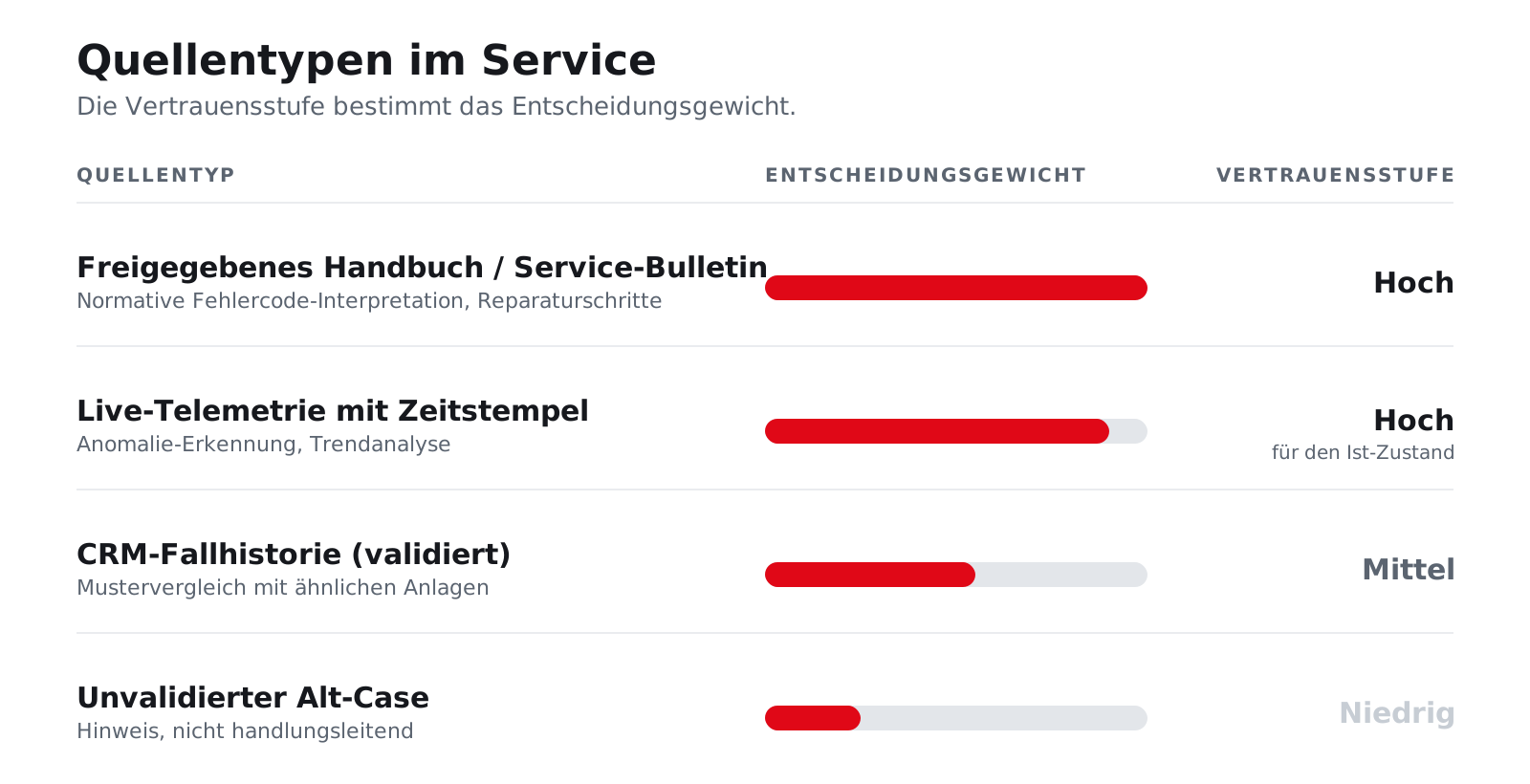
Not every source carries the same weight. A released service bulletin carries more weight in the field than an old, never-verified legacy case. That is why SDI distinguishes between released documents, live telemetry, and validated cases. As a result, an unvalidated sample is not treated with the same level of authority as a current manufacturer recommendation.
Often, this very distinction is missing in everyday practice. An old case note sits next to a current manual, as if both were equally authoritative. This is risky for the technician, because he has to figure out the difference on his own while under time pressure.
This is how a source type is converted into a clear decision weight:
| Source Type | Confidence Level | Typical Use |
|---|---|---|
| Published Manual / Service Bulletin | High | Standard error code interpretation, repair procedures |
| Live Telemetry with Timestamps | High for the current state | Anomaly detection, trend analysis |
| CRM Case History (Validated) | Medium | Pattern Comparison |
| Unvalidated Alt-Case | Low | Note |
When you use these trust levels in Salesforce, the technician receives a clear indication of the reliability of the information along with the response. This reduces the need for follow-up questions and makes it easier to document service decisions accurately.
How Service Decision Intelligence Bridges the Gap
From Distributed Systems to a Grounded Service Response
When service cases stall, it’s often not due to a lack of effort on the part of the teams. The problem is the lack of connection between data, documents, and the specific asset. This is exactly where Service Decision Intelligence (SDI) bridges the gap to reliable service decisions. SDI maps CRM, ERP, IoT, and documentation to a specific asset ID—using the Digital Machine File (IOTAM) as a common context. Every recommendation can be traced back to a sensor reading, ticket, and ERP entry via a verifiable audit trail.
The difference becomes immediately apparent when looking at example E-204 on SN-4711. SDI draws on the series-specific classification, the current telemetry data for this system, and validated cases from the service history. In addition, it incorporates normative knowledge from a knowledge management system such as Empolis as one source among many. logicline helped develop the Salesforce integration for Empolis Service Express. For service managers, this is precisely the point: The answer is based on a narrowed-down diagnostic hypothesis with verifiable source references rather than on a general excerpt from a manual.
This is particularly relevant in cases of disputed claims, recurring error patterns, or unclear causes. SDI functions as an intelligence layer: recommendations remain linked to their sources, can be traced within the customer context, and are not dependent on a single language model. In addition, EU-compliant options for data sovereignty within the customer’s infrastructure and mandatory source attribution for recommendations are standard requirements.
Entry into Level 3 – without having completed a major project beforehand
Many companies already have data in-house, but not in a form that leads to a sound service decision. That’s why it’s often possible to move to Stage 3 of the maturity model sooner than companies might expect: Digitize → Connect → Decide → Automate. SDI builds on existing sources, even if they are currently scattered across CRM, ERP, and IoT systems.
An Installed Base Assessment identifies which data sources are available and which SDI skills will deliver the greatest benefit first. This does not require a major IT project. All it takes is a structured review of the installed base, the current data landscape, and the issues that are currently causing service teams to lose time or escalate matters unnecessarily.
Often, the data is available but not linked to the asset ID. As a result, teams end up searching for answers simultaneously in tickets, PDFs, ERP forms, and emails. With SDI in Salesforce, this becomes a guided decision-making process in which the sources remain clearly visible.
A Comparison of Source Types
The sources themselves show why an answer is reliable.
| Source type | What question it answers | Impact on the answer |
|---|---|---|
| Validated documents (manuals, bulletins) | What should apply according to the manufacturer? | Binding error code interpretation and repair procedures |
| Live Telemetry (IoT, Sensor Data) | What is the system currently showing? | The answer is based on the machine’s current status |
| Old Cases (CRM/Tickets) | What has been observed in similar systems? | Recurring patterns and previous solutions |
| ERP Data (Batches, Warranty) | Which component is installed, and what is its status? | Clarifies warranty status and spare part compatibility |
SDI tests hypotheses against counterevidence before issuing a recommendation. If data is missing, the response openly acknowledges the gap rather than concealing it. Each recommendation is assigned a confidence level. For decision-makers, this is more than just a convenience feature: it distinguishes reliable service statements from mere assumptions.
What cannot be deduced from documents, telemetry, and case studies remains the domain of on-site experts.
Limitations, Conclusion, and Next Steps
Where AI in customer service still relies on human judgment
AI in service has a clear scope of application. Service Decision Intelligence (SDI) provides reliable answers where machines, telemetry, case history, and source data are brought together. Only when these four components are clearly defined can a service question be answered with the necessary certainty.
What the system cannot replace is implicit workshop knowledge. Experienced specialists often notice things that aren’t documented anywhere: an unusual noise, a series of minor malfunctions, or a pattern that isn’t yet visible in the data. This is precisely where human judgment remains essential.
If data is missing or a pattern has not yet been identified, SDI highlights the gap rather than providing an apparently reliable answer. This illustrates the practical limitations of any AI in a service context. For decision-makers, this is precisely the point: Not every question requires more automation right away. Often, it first requires a better data foundation.
Once this limitation becomes apparent, attention turns to the next bottleneck: the quality and availability of service and asset data.
Further Reading for Teams Building Their Knowledge Base
If you want to systematically build up your knowledge base in customer service, here are two relevant areas of specialization:
- AI in Customer Service with Its Own Knowledge Base
- Knowledge Management in Mechanical Engineering Services
Empolis often comes up in this context. logicline helped develop the Salesforce integration for Empolis Service Express. This is relevant in situations where documented knowledge, diagnostic workflows, and service context need to be brought together in Salesforce.
Next Step: Installed Base Assessment
A practical first step is an Installed Base Assessment. It identifies which data sources are available, where asset IDs, service history, and telemetry are still stored separately, and which SDI skills will provide the greatest immediate benefit. Often, the service data is available but scattered across multiple systems: The machine is known, the case is known, the operational data is known—just not in a unified context.
Two pragmatic approaches:
- Installed Base Assessment – when it is unclear which data sources are available and where asset IDs, cases, and telemetry data are currently stored separately.
- Initial Consultation – if you’d like to discuss a specific issue and how to turn distributed data into a concrete service solution.
