
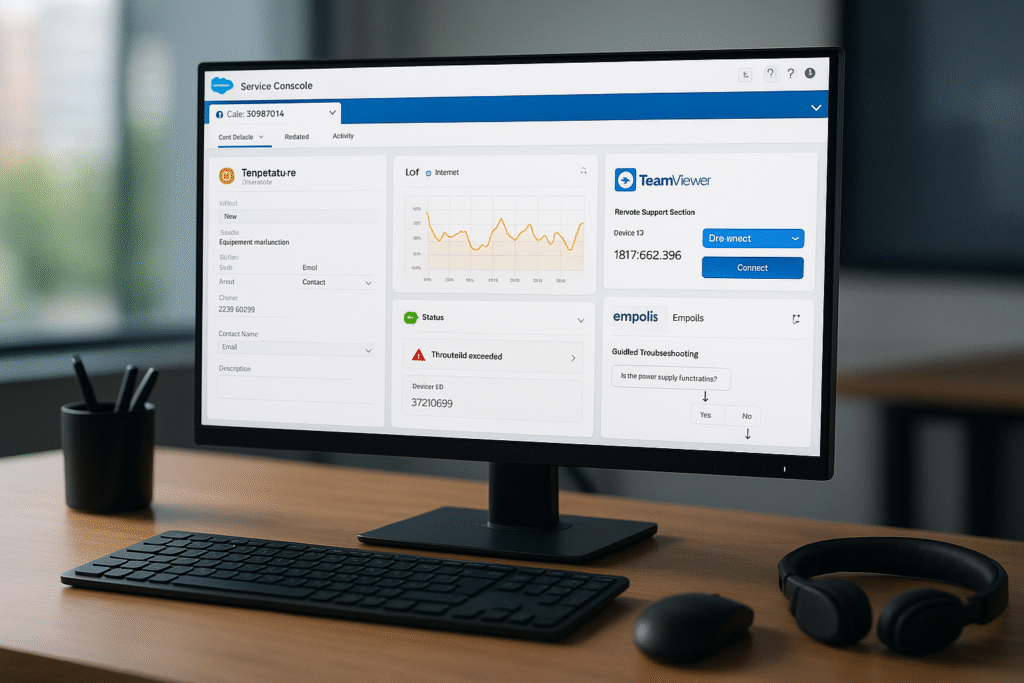
These days, service technicians rarely work on just one system. He accesses the ERP system, launches a separate tool for remote maintenance, searches a knowledge base for a solution, and checks the IoT portal for machine data. Every switch takes time, every interface is a point of disruption, and in the end, the information related to a single case is scattered across four systems. This makes it nearly impossible to achieve shorter response times and higher availability.
The answer isn’t another standalone tool, but rather a central hub that connects the existing building blocks. Salesforce is well-suited to serve as this service hub because customer, asset, and service data already converge there—and because the proven specialized solutions used in day-to-day service operations can be directly integrated. This article shows how interconnected building blocks form a seamless service ecosystem.
Why a Central Service Hub?
Traditional service models consist of separate systems: ERP for orders, a remote maintenance tool, various knowledge sources, and machine data in separate portals. The consequences are media discontinuities, duplicate data maintenance, long response times, and an incomplete view of the customer. At the same time, even B2B customers today expect digital accessibility and self-service.
A hub consolidates data and functions in one place. When a service technician opens a case, they can immediately see which system is involved, what equipment is installed, and what happened most recently—without having to switch between systems. That is precisely the difference between a collection of tools and an ecosystem in which the components work together.
Do your service teams constantly switch between systems?
In an introductory call, we’ll assess how your existing tools can be integrated into a seamless hub.
→ Schedule an introductory call
The Core: The 360° Database
At the heart of every service hub is a shared database. In Salesforce, asset information, service history, contracts, and—via the integration—IoT metrics are all consolidated in one place. The Digital Machine File maps the installed base in an object-oriented manner and links it to service, sales, and documentation. It is this 360° view that makes the connected specialized solutions truly valuable, because they all access the same context.
The Building Blocks of the Ecosystem
logicline does not see itself as a siloed provider, but rather as the hub of a proven service ecosystem. The following components are directly embedded in Salesforce:
Remote Support with TeamViewer
Remote maintenance is initiated directly from within the service case: the device ID is transferred, and the session is documented in the case. Especially with complex machines, visual access saves on site visits and increases the percentage of cases resolved on the first contact. logicline helped develop TeamViewer’s Salesforce integration.
Knowledge management with Empolis
Context-based knowledge is delivered right where it’s needed: Empolis Service Express suggests relevant solution articles directly for each case—based on the asset and the error symptoms. New employees find solutions faster, while experienced staff benefit from structured knowledge. logicline also helped develop this integration. The article explores how curated knowledge and operational context work together Knowledge management in Service.
Interactive 3D Tutorials with vSTAGE
Using vSTAGE, the CAD data from the design is transformed into interactive 3D models that allow users to navigate through the assembly—rotating it and disassembling it step by step. Embedded in the portal, the system guides users from the fault code to the corresponding 3D sequence and all the way to ordering replacement parts from the bill of materials. Details in the article Interactive 3D Service Manual in the Customer Portal.
IoT Data and Predictive Maintenance
Machines send operational and status data, which is linked to the asset in the hub. If a value exceeds its threshold, a service request is automatically generated. This shifts service from a reactive response to a predictable service—provided the data is contextualized within the plant’s operations rather than presented as an isolated dashboard.
Complete History with GRAX
For machines with long lifecycles, access to the complete service history is crucial. Through the GRAX integration, Salesforce history can be analyzed without API limits—within the customer’s data environment, without replication to external clouds. This also serves as the data foundation for AI-driven decisions.
Why a Hub Is Better Than Point Solutions
The difference from a collection of individual tools lies in the shared database. Sales and service teams don’t work across integrations—they work from a single source. This prevents the creation of new silos and redundant data maintenance, and every connected solution accesses the same up-to-date context. For the customer, this means a seamless experience; for the manufacturer, it means less friction and a robust foundation for automation.
| Approach | Point solutions side by side | Ecosystem Hub |
|---|---|---|
| Data Base | Distributed; each system has its own | Shared, 360° view |
| Sales ↔ Service | Only through integration | From a single data source |
| Maintenance requirements | Multiple, redundant | Once, centrally |
| Foundations of AI | Fragmented | Connected and usable |
A typical scenario
A typical workflow illustrates how the ecosystem works together. A system reports a malfunction via the IoT connection; a service case is automatically created in the hub, linked to the asset and the customer. The service technician opens the case and sees, all in one view, the machine file, the suggested knowledge articles from Empolis, and the corresponding 3D sequence from vSTAGE. To perform a remote diagnosis, the technician starts a TeamViewer session directly from the case; the complete history of the model series is available via GRAX. If the problem cannot be resolved remotely, the on-site service call is prepared with all necessary information—and the required spare part is ordered immediately from the bill of materials. No switching between systems, no loss of information, a seamless process.
From the Hub to decision intelligence
A hub that connects data is essential for the next step: deriving well-informed service decisions from that data. Service Decision Intelligence (SDI) is built precisely on this principle. It integrates the data from ERP, Salesforce, IoT, and documentation that has been consolidated in the hub and provides AI agents with a well-founded basis for decision-making—complete with a source citation and an assessment of its reliability. Through open standards such as the Model Context Protocol, the same data can be used by Agentforce, Claude, or other models without having to rebuild the architecture for each provider.
Important to note: The intelligence layer runs on the customer’s infrastructure, and every recommendation is traceable. This ensures that data sovereignty and the requirements of the EU AI Act are built in from the outset—an aspect that the article “Data Sovereignty in AI Services” explores in greater depth.
Step by Step to the Hub
A service hub doesn’t have to be built all at once. It makes sense to build it based on actual needs: Those already using Salesforce often start with the 360° view and the Digital Machine File as a foundation and then integrate the module that resolves the biggest bottleneck—often remote support or self-service. Additional modules, such as knowledge management, 3D instructions, or decision intelligence, are added once the foundation is in place. Because they all build on the same data foundation, the architecture remains consistent and the effort required for each step is manageable. This way, the hub grows with the requirements, rather than having to completely overhaul the entire service business all at once as part of a major project.
Conclusion
A service hub is more than just another piece of software. It connects the proven building blocks of day-to-day service operations—remote maintenance, knowledge, 3D instructions, IoT, and a complete history—into an ecosystem based on a shared database. logicline acts as a hub, not a silo: with custom-developed integrations and an architecture that is consistent from a 360° view all the way to decision intelligence. The result is faster response times, fewer media breaks, and a robust foundation for scalable service.
You can quickly determine where your service ecosystem stands today:
- Assessment: An Installed Base Assessment shows which systems and data can be connected to a hub.
- Discuss the process: In a no-obligation introductory call , we’ll determine which components will provide the greatest benefit for you right away.
FAQs
What is a service hub in machinery and equipment?
A service hub is a central platform that brings together the previously separate systems used in day-to-day service operations—ERP, remote maintenance, knowledge bases, and IoT portals—on a shared data foundation. Instead of switching between tools, service employees can view all relevant information about the asset, the customer, and the case in one place. Salesforce is well-suited to serve as this hub because customer, asset, and service data already converge there, and specialized solutions can be directly integrated.
Which systems can be integrated into Salesforce as a Service Hub?
Key components include TeamViewer for remote support, Empolis Service Express for knowledge management, vSTAGE for interactive 3D instructions, IoT platforms for live machine data, and GRAX as a data lakehouse for the complete service history. logicline helped develop the Salesforce integration for TeamViewer and Empolis and connects the other components using the same database.
What is the advantage of a hub over individual specialized solutions?
The difference lies in the shared data foundation. With standalone point solutions, data is scattered; sales and service teams must rely on integrations to work together, and data maintenance is redundant. In a hub, all components access the same up-to-date context: a 360° view without new silos, without duplicate data maintenance—and a robust foundation for AI-driven decisions and automation.
How do you get started building a service hub?
Step by step, based on actual needs. Those who already use Salesforce typically start with the 360° view and the Digital Machine File as a foundation, and then integrate the module that resolves the biggest bottleneck—often remote support or self-service. Additional modules, such as knowledge management, 3D instructions, or decision intelligence, are added once the foundation is in place. This way, the hub grows with your needs, rather than requiring a major project to overhaul everything at once.
