

Service sales: from reactive to structured
Many companies in the DACH region take a reactive approach to service sales: maintenance contracts are renewed only shortly before they expire, and spare parts are shipped only upon request. This approach carries risks: competitors gain customers, while internal data remains scattered and underutilized.
Solution: Structured service sales campaigns
With a central database and clearly defined processes, companies can make targeted use of their installed base. The 4-step model—“Digitize → Connect → Decide → Automate”—describes how scattered data can be transformed into a scalable sales pipeline.
- Digitize: Centrally record all machine data (e.g., year of manufacture, contract status, telemetry data).
- Connect: Combining data to segment target audiences.
- Decide: Identify triggers such as expiring contracts or wear-and-tear patterns.
- Automate: Trigger campaign sequences, field service tasks, and portal actions without manual intervention.
Example: A maintenance contract expires in 90 days. An opportunity is automatically created, field representatives receive the relevant data, and the customer is contacted in a timely manner. Such processes increase the contract renewal rate and tap into untapped revenue potential.
Conclusion: A structured approach to service sales protects existing customer relationships and strengthens competitiveness in the long term.
The four-stage model for service sales campaigns
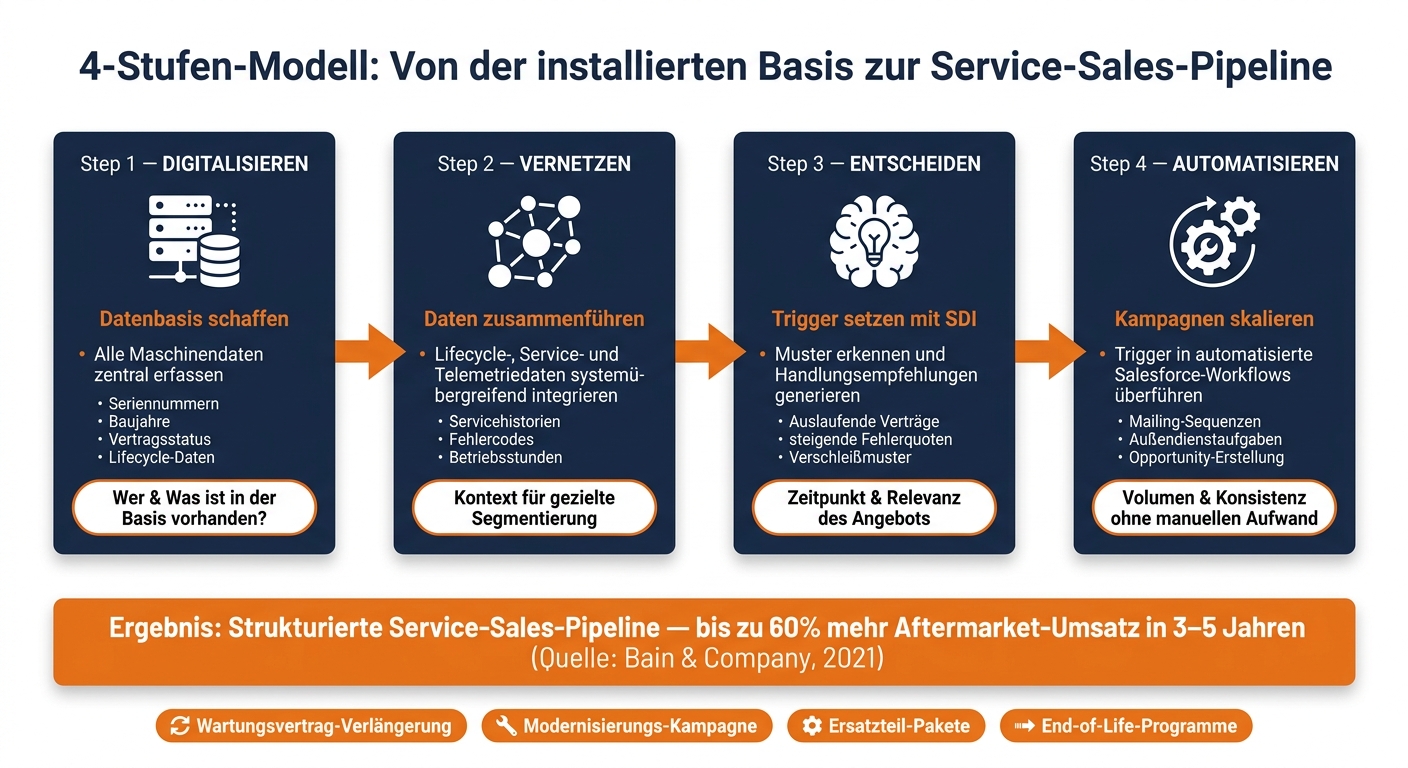
Structured, scalable service distribution requires clear steps. The four-stage model provides a systematic approach to move from a reactive approach to a data-driven pipeline. Each stage builds on the previous one, and skipping leads to gaps that can jeopardize the entire process.
Step 1: Digitize – Creating a Digital Inventory
The first step is to collect all relevant equipment data: serial numbers, years of manufacture, locations, contract status, and lifecycle information. This data forms the basis for the Digital Machine File. It marks a departure from the “sell and forget” approach and ensures a centralized database. Without this overview, the sales department remains trapped in an inefficient, reactive way of working, as fragmented data obscures opportunities and risks.
Step 2: Connect—Consolidating Data and Making It Usable
In the second step, the collected data is linked together: lifecycle information, service histories, and telemetry data are integrated across systems and made available in the CRM. This enables targeted segmentation. For example: Equipment of a certain type that is more than eight years old and does not have an active maintenance contract can be identified as a potential target segment. In this way, the data collected in the first stage provides valuable context for the sales team.
“Service doesn’t actively sell; it identifies opportunities. With the right tools, these opportunities can be automated into campaigns.” – logicline
Step 3: Decide – Set Triggers with Service Decision Intelligence
Data alone is not enough to launch effective campaigns. This is where Service Decision Intelligence (SDI) comes into play. This technology identifies patterns in telemetry and service data—such as rising error rates or expiring contracts—and uses them to generate precise triggers for the sales team. Crucially, the data remains on the customer’s infrastructure and complies with all EU regulations. Each recommendation is accompanied by a source citation, allowing the sales team to understand the rationale behind every action.
Step 4: Automate – Implement Campaigns Efficiently
In the final step, the defined triggers are incorporated into automated campaigns. With Salesforce Workflows, email sequences, field service tasks, or portal notifications can be automatically initiated when recognized patterns—such as churn—are detected. This automated approach automates the repetitive task of assigning triggers, attachments, and opportunities and ensures consistent processes. At the same time, it lays the foundation for measurable success that can be factored into future optimizations.
The following overview shows how these service strategies contribute to improving the pipeline in the machinery and equipment industry:
| Level | Focus | Contribution to the pipeline |
|---|---|---|
| Digitize | Database | Identifies who and what is in the database |
| Connect | System Integration | Provides the context (history, usage) for segmentation |
| Decide | Intelligence | Determines the timing and relevance of the offer |
| Automate | Execution | Ensures volume and consistency without manual effort |
Discover the service and sales opportunities hidden in your installed base—all in 30 minutes.
We’ll take a specific machine or customer segment and show you which triggers (maintenance contracts, upgrades, spare parts) can be derived from lifecycle and service data. This isn’t just a slide presentation—it’s a pipeline-focused look at your installed base.
→ Schedule an introductory call
Step 1: Digitize – Building a Structured Installed Base
Consolidate data from scattered sources
The first step—Digitize—involves capturing the installed base in a comprehensive and structured manner. Machine and equipment data is often scattered across various systems: ERP systems, PDF reports, Excel spreadsheets—frequently without a clear association with specific pieces of equipment. The goal is to consolidate this information into a central database. Only then can targeted decisions be made about which customers to approach with which offers. This central database serves as the foundation for the Digital Machine File described below.
Contents of a digital machine file
A digital machine file combines master data with life cycle and service information to provide a comprehensive picture of each machine:
| Data Category | Important Fields | Campaign Purpose |
|---|---|---|
| Master Data | Serial number, machine type, year of manufacture | Identification for spare parts quotes |
| Contract Information | Warranty Expiration, Maintenance Contract Status | Campaigns for contract renewals and new contracts |
| Operating Data | Operating hours, fault codes, sensor data | Solutions for Predictive Maintenance and Modernization |
| Commercial Data | Last spare parts order, service history | Cross-selling and churn prevention |
| Location Information | Customer location, contact person, address | Planning of regional service tours and technician assignments |
Lifecycle and contract data are particularly important for enabling targeted campaigns. For example, without the exact expiration date of a maintenance contract, a renewal campaign cannot be launched in a timely manner—such as 90 days in advance. Similarly, the installation date is crucial for segmenting older systems specifically for modernization offers.
Fill Data Gaps with an Installed Base Assessment
Manufacturers often overestimate the quality of their existing data. A structured Installed Base Assessment reveals where data is missing: Which systems do not have an active maintenance contract? For which machines is the current location unknown? Which devices have been in operation for over ten years without a documented service history?
“The individual market potential must be assessed in order to determine the service’s actual performance capability. This is the foundation for a successful service strategy.” – Dr. Martin Habert, service expert, bachert&partner
The assessment is not a one-off cleansing process. It provides a prioritized overview of data gaps and shows which segments are already campaign-ready and which data first needs to be supplemented. This could mean for a manufacturer with 8,000 installed systems: Part of the base can be used directly for contract renewal campaigns, while master data must first be completed for older systems without a telemetry connection. This prioritization forms the foundation for the next steps in the campaign process.
Step 2: Connecting the Dots – From Data to Segmented Campaigns
Linking lifecycle and telemetry data
In the second phase, “Connect,” static lifecycle data is combined with dynamic telemetry data. It is only by linking information such as year of manufacture, contract status, and service history with telemetry data (e.g., fault codes, operating hours, or vibration values) that actionable segments for targeted campaigns are created.
An example from the custom machinery sector illustrates this: A machine built in 2013 is initially just an isolated data point. However, if you factor in a rising error rate from telemetry and consider that the maintenance contract expires in 85 days, it becomes a clearly identifiable candidate for offers to extend the contract or upgrade the machine.
Define segments for campaigns
Precise segmentation is crucial in order to target only relevant machines. Typical segments for a manufacturer with around 8,000 installed machines could be as follows:
- Contract extension: Machines with maintenance contracts that expire in less than 90 days.
- Modernization: Machines older than 8-12 years, combined with an above-average error rate.
- Wear parts: Machines whose operating hours have reached or exceeded a specified maintenance interval.
- End-of-Life: Machines in the final phase of their life cycle without an active service contract.
According to the VDMA, many machinery and equipment manufacturers currently provide active service support to only 10% to 25% of their installed base (VDMA, “Machinery and Equipment Service Study,” 2022). This shows that a large portion of the installed base can be targeted through structured data networking and segmentation.
Not all machines within a segment fall equally short of their potential. A comparison with a group of machines of the same design reveals which ones fall short and why—read more about this in the article “Identifying Aftermarket Potential per Machine.”
Once the segments have been defined, the next step is to assign specific data fields as triggers.
Map data fields to campaign triggers
The following table shows how specific triggers for campaigns can be derived from the digital machine file:
| Data Field | Trigger Condition | Campaign Type |
|---|---|---|
| Contract Expiration Date | < 90 days until expiration | Maintenance Contract Renewal |
| Age of the system | > 10 years since installation | Modernization/Retrofit Campaign |
| Operating Hours | Reaching the maintenance interval | Preventive Maintenance / Spare Parts Package |
| Fault Codes (Telemetry) | Critical or recurring signal | Immediate service call / spare parts quote |
| Last Spare Parts Order | No orders since > —24 months | Wear-and-tear Parts Reminder / Safety Check |
| Warranty Status | Warranty expires in < 60 days | Service Level Agreement Offer |
Without this mapping logic, the existing data remains unused. However, a clear mapping of triggers lays the foundation for targeted, trigger-based sales activities. These form the basis for optimization through Service Decision Intelligence (SDI) in the next phase.
Four campaign types along the lifecycle
Before SDI controls the triggers in practice, it’s worth taking a look at the most important types of repeatable campaigns. These stem directly from the segments and triggers identified in Step 2 and form the operational foundation upon which the subsequent Steps 3 (Decide) and 4 (Automate) are built.
Maintenance Contract Renewal
The 90-Day Trigger provides a clear and effective starting point for structured service-sales campaigns. As soon as a maintenance contract is set to expire in less than 90 days, there is sufficient time for budget approvals and objective negotiations.
Prioritization is based on criteria such as contract value, system age, and service history. High-value systems with frequent malfunctions and a high contract value are given priority and are contacted in person by the field service team. Smaller systems with a stable operating history, on the other hand, can be efficiently renewed through automated email sequences.
This campaign facilitates the entry into a structured pipeline and creates the basis for further lifecycle offers.
Modernization campaigns
Modernization campaigns are launched when equipment is between 8 and 12 years old and is experiencing an increased failure rate. During this phase, maintenance costs typically rise, spare parts are less available, and the machine’s performance declines—the so-called “performance gap.” Only when both criteria are met is the machine included in the modernization segment, in order to avoid wasted effort and to target sales resources effectively. Our in-depth article explains how to systematically structure such retrofit campaigns at the end of the life cycle.
This campaign expands the structured pipeline and paves the way for further automation steps.
Spare Parts Kits
Telemetry data provides valuable insights into wear patterns even before a failure occurs. If vibration levels or operating hours exceed defined thresholds, a customized spare parts quote is automatically generated that is precisely tailored to the machine’s usage profile. With this proactive approach, the manufacturer takes action before customers have to do so themselves. This reduces unplanned downtime and ensures stable revenue in the spare-parts business. To ensure that capital isn’t tied up in inventory while critical parts are out of stock, the right balance between spare part costs and availability is essential.
This campaign also complements the structured pipeline and leads to further automation.
End-of-life programs
Machines that are in the final phase of their life cycle require a dedicated campaign strategy. Typical indicators include spare parts that are no longer in production, available successor models, or an internally designated end-of-life status. Without actively managing this segment, there is a risk that customers will decide on alternative solutions from other providers.
A successful end-of-life campaign combines a final spare parts package with attractive terms in the short term with offers for replacement equipment or upgrade programs in the medium term. The key lies in early and transparent communication, so that the customer does not have to wait until certain parts are no longer available to realize this.
In the next step, SDI uses these triggers to automate and scale the implementation of the campaigns.
Step 3: Decide – Service Decision Intelligence as a Trigger Engine
Following the preparatory work in Step 2 and the overview of the four campaign types, we will now move on to the practical application of Service Decision Intelligence (SDI). SDI serves as the link between the raw data from the installed base and the operational processes in sales. The goal is to generate precise, market-oriented triggers from the available data that provide targeted support to the sales team.
How SDI Analyzes Data Patterns and Transforms Them into Actions
SDI uses telemetry data and service histories to derive specific recommendations for action. For example: A machine is showing unusually high vibration levels, the associated maintenance contract expires in 90 days, and a suitable modernization package is available. SDI automatically recognizes this pattern and creates a prioritized trigger—without the need for manual verification.
However, this requires a structured database that links real-time telemetry with historical service data. Only once this foundation—in accordance with the second stage of the 4-step model—has been established can SDI generate reliable and relevant triggers. Without this foundation, the intelligence layer remains ineffective.
Transparency and control: data sovereignty is key
For the recommendations from SDI to be accepted by customers and sales representatives, it is crucial that they are transparent. SDI therefore provides clear source citations for each trigger. For example: Instead of a general recommendation such as “Modernization recommended,” SDI shows in detail which factors led to this conclusion—such as an increased error rate since the last maintenance, exceeding the operating hours limit, or the unavailability of a spare part.
Another advantage: SDI runs directly on the customer’s infrastructure and complies with EU data protection requirements. As a result, sensitive machine data remains under the company’s control and does not end up in external clouds without oversight. This combination of data sovereignty and transparent recommendations builds trust in the solution—among both end customers and the sales team.
Automated Campaign Management with SDI
In day-to-day operations, SDI seamlessly integrates the generated triggers into Salesforce workflows that drive the corresponding campaigns. A maintenance contract trigger appears directly as a prioritized opportunity in the CRM of the responsible field service representative. A modernization trigger automatically initiates a campaign sequence with a suitable quote. A spare part trigger sets off a series of emails in a timely manner before the customer notices a breakdown.
In this way, SDI enables a structured and automated approach to sales. Employees can focus on prioritized campaigns, while SDI transforms the entire process into a repeatable and efficient sales workflow.
Step 4: Automate – Scale Campaigns
A trigger initiated by SDI starts a predefined sequence of actions in Salesforce. Each campaign follows a clear process: trigger, segmentation, action, and follow-up.
A typical example from the custom machinery manufacturing sector, which has 8,000 installed systems: If a maintenance contract expires in 90 days, Salesforce automatically creates a prioritized opportunity and assigns it to the responsible field service representative. If, at the same time, telemetry data indicates a rising error rate, the opportunity is directly linked to a modernization proposal. The sales representative receives not only the assignment but also all relevant data—from operating hours and service history to current telemetry readings.
Scaling begins with a minimum viable product (MVP): a campaign, a machine type, a defined trigger. Only when this process is stable and achieves measurable results is the model extended to other segments. Standardized campaign templates ensure that new campaigns can be created efficiently. The focus here is on repeatability and scalability.
Reactive vs. automated: A direct comparison
The difference between a reactive and an automated approach becomes clear in the following comparison:
| Characteristic | Reactive Approach | Automated Approach |
|---|---|---|
| Data Source | Maintained manually in Excel/via email | Structured machine records, lifecycle, and telemetry data in Salesforce |
| Time | After a customer call or outage | Proactively, based on lifecycle triggers (e.g., 90 days before the contract expires) |
| Sales Process | Manual quote generation upon request | Automatic opportunity creation and lead assignment in the CRM |
| Customer Experience | Unplanned, reactive | Scheduled maintenance, proactive outreach |
| Revenue Potential | Limited to repairs and individual inquiries | A segment that can be effectively targeted across the entire installed base |
According to the Bain study “Winning in Industrial Aftermarkets” (2021), manufacturers that systematically monitor their installed base and prioritize service sales can increase their aftermarket revenue potential by 30 to 60 percent within three to five years. According to industry experts, German machinery and equipment manufacturers are currently tapping into only a small portion of their installed base with service offerings. A structured and automated approach offers the opportunity to leverage this potential much more effectively.
The next step with automated campaigns is the continuous monitoring and optimization of sales performance.
Measure and continuously improve campaign success
KPIs for service sales campaigns
Automated campaigns only deliver long-term results if it is clearly defined how success is measured. Key metrics include the contract renewal rate, the campaign conversion rate, and penetration of the installed base. These metrics not only show how effective the campaigns introduced in the previous phase are, but also serve as a basis for the targeted further development of SDI triggers.
For every campaign—whether it’s a contract renewal, a modernization, or the sale of spare parts packages—clear targets should be defined in order to assess the effectiveness of the triggers. Dr. Martin Habert, a service expert at bachert&partner, emphasizes:
“What matters is not the profit margin, but the comparison between planned and actual results. Rigorous monitoring and transparency of financial figures, combined with a clear strategy and defined measures, are the appropriate tools for evaluating and managing the service business.”
Refine SDI triggers based on campaign results
Analyzing campaign results plays a key role in the further development of SDI triggers. This data provides valuable insights for continuous improvement. For example: If a modernization trigger achieves a high conversion rate for systems between 8 and 12 years old but is largely unsuccessful for systems older than 12 years, this indicates that age alone is not a sufficient criterion. Additional parameters, such as the cumulative error rate from telemetry or the number of open service cases, should be integrated into the trigger logic.
SDI can identify such patterns when campaign data is systematically fed back into the system. Every opportunity and every piece of feedback helps optimize the trigger logic. Through this iterative process, each campaign becomes a learning entity. This translates the third step of the model— Decide—into a repeatable, data-driven sales strategy.
TRUMPF provides a practical example; at the PARTS SUMMIT 2025, the company presented its “Data-Driven After-Sales” strategy. This strategy integrates machine data directly into the sales logic to precisely determine which systems should be targeted with which offer and at what time. This approach creates a continuous optimization cycle that further increases the efficiency and impact of automated campaigns.
Conclusion: From reactive to structured – the path to the service sales pipeline
The most important findings
The transition from a reactive to a structured service sales approach begins with a thorough analysis: Where is the data on the installed base located, and which events in the life cycle of the systems have not yet been utilized?
The 4-step model provides clear guidance. Only when lifecycle, service, and telemetry data are linked to sales processes can robust segments be created. Service Decision Intelligence translates these data patterns into concrete recommendations for action, such as triggers for contract renewals, modernization campaigns, spare parts offers, or end-of-life programs. The result: a pipeline that improves through continuous feedback—each campaign becomes more precise than the last.
These findings can be used to prepare the start of a structured service sales process in a targeted manner.
Where to start
The first step, therefore, is not a sales tool, but an honest assessment: Which machine segments are currently generating which service revenue, and where are the biggest untapped opportunities—contract renewals, modernization, or spare parts? The Installed Base Assessment delivers precisely this data set and a concrete leverage report within 4–6 weeks. On this basis, service sales campaigns can be planned rather than based on gut feelings. If you already have a structured foundation and want to specifically assess where the first trigger is taking effect within your own organization, schedule an introductory call right away.
